01 / REQUEST
Choose a visit.
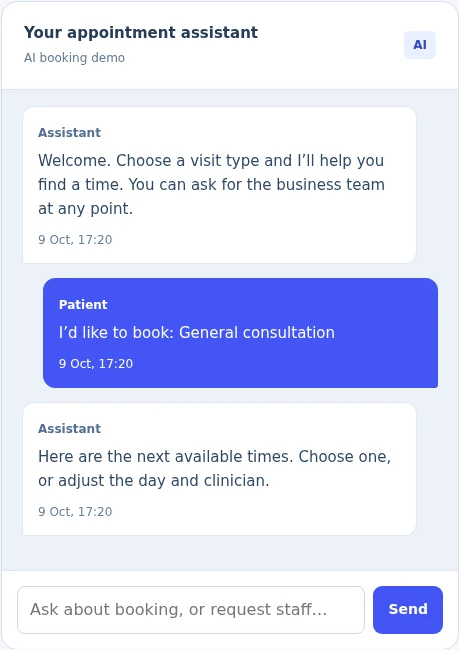
The patient selects a general consultation and sees the next available sample times.
Fictional browser simulation


EVOLARIC CLINICFLOW / FOR CLINIC AND DENTAL TEAMS
Explore how booking, appointment changes and staff follow-up could work together for your clinic or dental practice. Try the fictional prototype, then discuss the administrative workflow your team wants to improve.
Discuss your clinic workflow01 / SEE THE WORKING PROTOTYPE
These are real screen captures from one prototype session: a sample request, a simulated appointment, then a request for the reception team. Every person and clinic shown is fictional.
The patient selects a general consultation and sees the next available sample times.
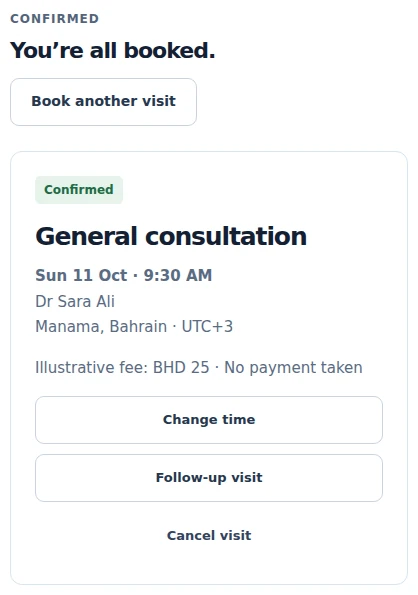
A selected time becomes a sample appointment, with options to change or cancel it.
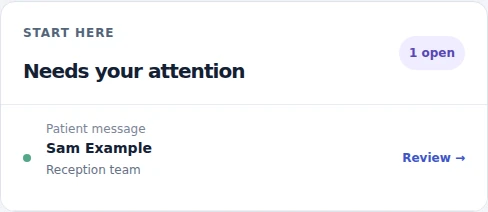
After booking, fictional patient Sam Example asks for staff. The workspace shows a reception-team action.
Book a fictional visit, ask for staff in the conversation, then open the workspace to review it.
Start with the patient viewSee the full prototype overview02 / A FOCUSED ADMINISTRATIVE SCOPE
The proposed service covers appointment administration. Clinical assessment, diagnosis, treatment advice and clinical records are outside its scope.
Explore sample clinician hours, visit lengths, notice periods and room or dental chair availability when booking, moving or cancelling a visit.
Rehearse reminders, cancellation waitlists and requests for a person. Messages and responses stay simulated in the browser.
Review the sample schedule, linked conversations and staff tasks. The workspace has no live staff accounts or shared patient records.
English and Arabic patient-flow examples are available. They do not establish complete Arabic coverage or a live bilingual service.
03 / THE FIRST ENGAGEMENT
Start with the administrative task you want to improve, your existing scheduling system and the person who owns follow-up.
The intended output: a short outline of the workflow, system constraints, staff handoff and open questions, so we can decide together whether a scoped pilot is feasible.
Prepare a ClinicFlow enquiryServices, clinicians, rooms or chairs, changes, notice periods and cases that need a person.
The authoritative scheduling system, available interfaces, information needed and how conflicts would be reviewed.
Agree what would need testing, who would operate the service, data handling, language needs and the scope for commercial discussion.
A live pilot needs separate agreement, tested integrations, suitable data handling, operating responsibilities and acceptance tests. The prototype connects to no clinic system.
BEFORE WE TALK
ClinicFlow is in development. The interactive prototype is available to explore with fictional information. A live pilot requires an agreed scope, tested integrations, appropriate data handling, operating ownership and commercial terms.
No. Booking, rescheduling, cancellation, reminders and staff messages are simulations inside the browser. They do not reach a clinic, patient, calendar, messaging account or payment provider.
No. Use fictional information only. The prototype is designed for exploration, with demo state kept in browser memory and reset on reload. It is not a clinical record system or a place to enter personal, patient or clinical information.
The prototype includes clinic and dental scheduling scenarios, including clinician, room and chair availability, plus English and Arabic patient-flow examples. This does not establish complete Arabic coverage or live bilingual service availability. A pilot would need language-specific content review and testing.
The prototype demonstrates an existing-system rehearsal with fictional records. There is no active connection to a clinic system. Feasibility would depend on the selected system, permitted interfaces, data mapping, scheduling ownership and tested handling of conflicts.
Live service pricing is not published. Scope, expected usage, integration work, support and operating costs would be assessed for a proposed pilot. Prototype examples are not a commercial quote or evidence of measured savings.
YOUR REAL WORKFLOW / A SEPARATE CONVERSATION
Tell us about the appointment process and the administrative task you want to improve. A business-process description is enough; please do not send patient or clinical information.
The email action opens a fixed draft in your email application for you to review and send. Nothing is submitted by this website. You can also copy hello@evolaric.com. Prototype entries are not included.